Jetbrains Fatigue
I’ve been a Jetbrains customer since 2013, when I bought a license for WebStorm, then a license for IntelliJ the following year. This was the pre-subscription days where I paid a one-off fee and got a certain period of updates as part of the price.
At the time the only real competitors in the Java world were Eclipse and NetBeans, but I quickly grew to love the experience of using JetBrains products. When they moved to a subscription model (causing considerable uproar if I remember correctly) it was a no-brainer. I’ve been a happy user since then, and I’ve never considered an alternative since, even with the massive growth of VSCode.
The last few years have become increasingly frustrating, however. There’s no one specific thing that’s caused my irritation, but this screenshot sums it up quite well.
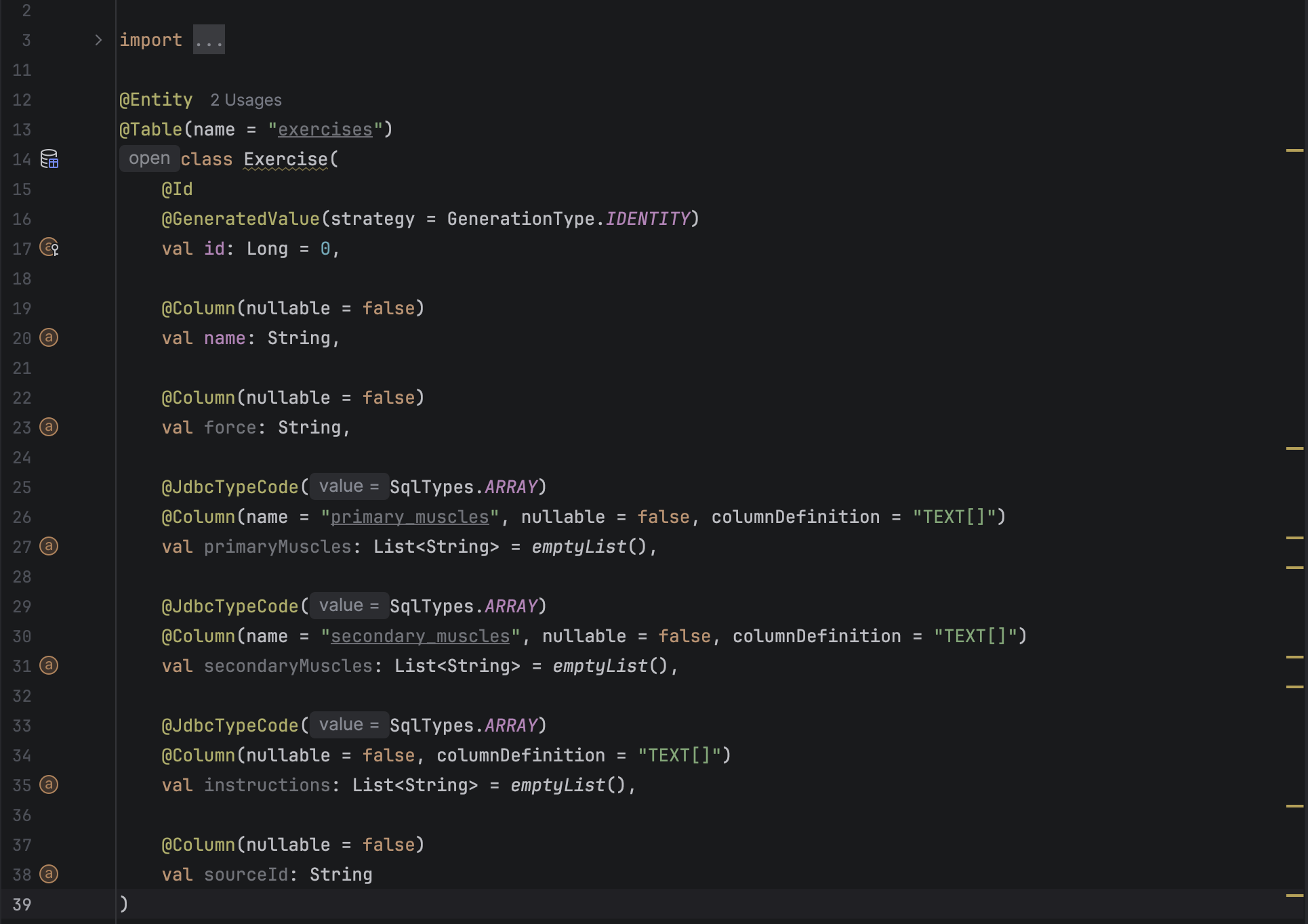
This is a simple Kotlin class. JetBrains seem absolutely determined to add as much “stuff” to the text editor as they can, often getting in the way of the developer just trying to read the code. It’s important to note that all of this can be turned off, but new releases seem to enable this stuff by default, meaning each release I have to go find some arcane part of the menu to disable the thing they’ve just added.
Let’s go line by line:
Line 12: @Entity has 2 usages. What am I supposed to do with that information? if I want to know this, I can find out from the context menu.
Line 13: exercises is greyed out. Why? because I don’t have a datasource connected.
Line 14: Exercise is highlighted - it’s a warning that my members are val but Jakarta will overwrite them so I should rename them to var.
This is technically correct but setting them as val stops the developer of the application changing them, which is what I actually care about in this case.
Line 26,31: Same as Line 13.
Line 25, 29, 33: the inclusion of the parameter name as a hint. I can’t overstate how distracting this is when you have several parameters.
All of the fields have little icons because the IDE has determined this is an entity. Most of them when clicked just say nothing here.
This is forgetting the things I’ve turned off already, such as the most recent author of a line.
As I’ve stated, I can turn these things off but I don’t want to have a round of “read the documentation” every release I install. Other fun things that have happened after installing updates:
- I keep losing my back/forward buttons on the toolbar
- I’ve lost my run configurations from all products before
- DataGrip lost all my connections recently
- The Github Copilot plugin breaks all the time - even between updates. I don’t know why.
I mostly just want my IDE to get out of my way. VSCode is certainly not perfect, but I’ve recently found myself using it more and more because I can’t be bothered opening a JetBrains product. The only exception to this is DataGrip, I’ve not found anything close to being this useful for databases yet.
I’ll probably keep my subscription for a few months but the writing is on the wall.